Design a Kitchen From a Photo With AI: How It Works
KitchenGPT6 October 20264 min read
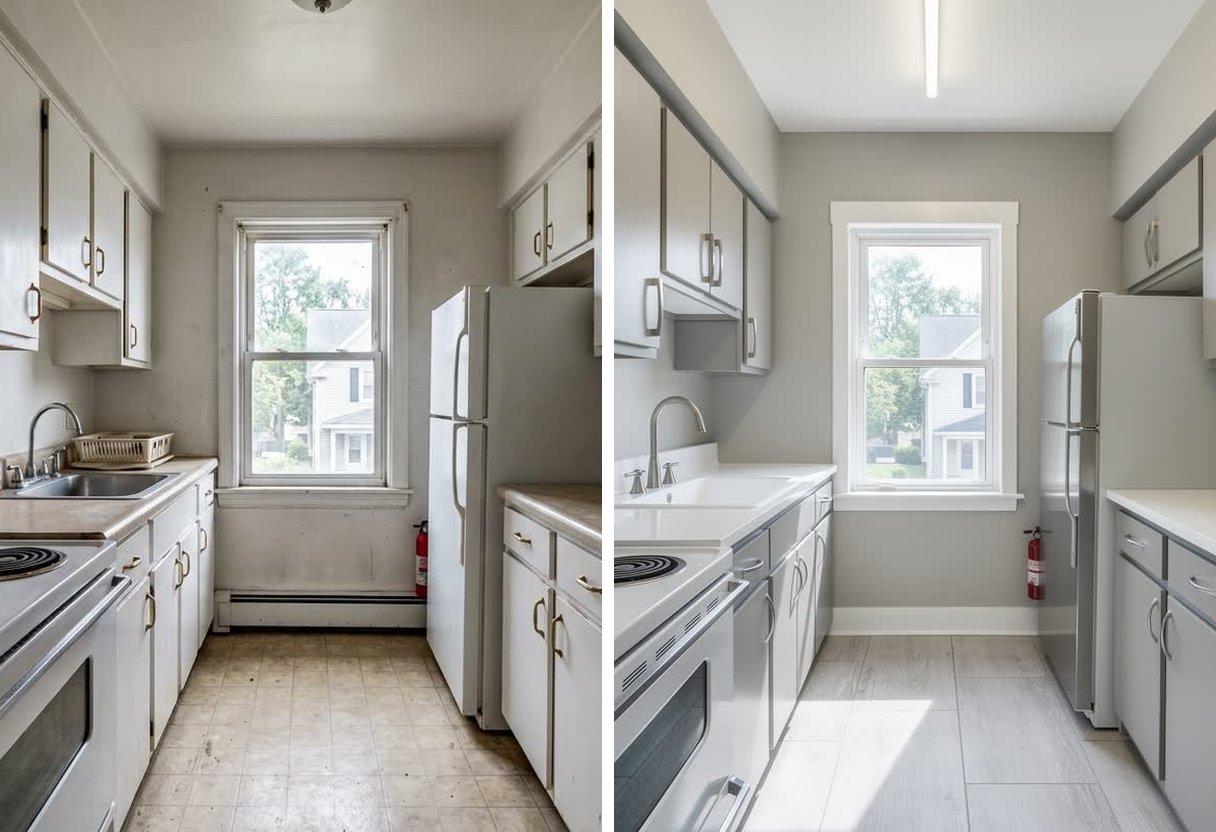
Yes, you can design a kitchen from a photo. You upload one picture of your kitchen, pick a style, and get the same kitchen back in that style.
The part that matters is whether the result is your kitchen. Some tools keep your layout and change only the finishes. Others invent a new room that looks nice and cannot be built. Below is how it works, what to check in the result, and what costs money. To see where you stand, you can take the free 2-minute quiz.
How design from a photo works
Your photo is the floor plan. The tool reads where the walls are, where the window sits, where the sink and range stand, and how long each run of cabinets is.
Then it changes the surfaces: cabinet color, doors, countertop, floor, handles. A good tool treats the room as fixed and the finishes as the only things that can move. We wrote a five-minute test for this if you want to check a tool before you trust it.
That is the whole idea. The photo tells the tool what must stay. The style tells it what can change.
For a closer look at the tool itself, see the AI kitchen design feature page.
Why generic image tools move things
A general image tool, like the image feature in ChatGPT, is built to make a good-looking picture. It is not built to keep a room still.
When we ran a test on one photo, a loose instruction gave a beautiful kitchen with a different window, a different range, and no sink at all. The same model with strict layout instructions kept all three. The full test, with pictures, is in Can ChatGPT design your kitchen?
The lesson is simple. Moving things is the default for a general tool. Keeping things in place has to be built in.
What to check in any result
Do not judge the result by how good it looks. Judge it by whether it matches your room. Put your photo and the result side by side and check four things.
- The window. Same position, same size, same shape?
- The range or cooktop. Same place, same type? A freestanding range should not turn into a slide-in.
- The sink. Is it still there, under the same window?
- Wall length. Does each run of cabinets reach from the same corner to the same corner?
If any of these changed, the picture is a mood image, not a plan. It can still help you choose a color. It cannot help you order cabinets.
This check matters because renovation regret is common. In one survey, 58% of homeowners said they regret at least one aspect of their renovation.1 A major kitchen remodel costs about $55,000 at the median in the US.2 A wrong picture is a cheap way to find a wrong choice, but only if the picture is true to your room.
What is free
Here is the honest list.
- The free 2-minute quiz. You answer a few questions, pick the looks you like, and add one photo of your kitchen. The quiz is free to take. To open your kitchen in the style it picks for you, you choose a plan. Start the quiz.
- The free tier of ChatGPT. Good for planning with words: a budget, a list of questions for contractors, the order of the work. It is not reliable for pictures of your exact room, as covered above.
The design tools are on paid plans. That includes opening your kitchen in a new style, trying many styles, and saving the results to share with a contractor.
How to take a photo that works
A good photo gives the tool more to work with. A bad one makes every result worse.
- Stand in the doorway. Pick the spot where you can see the most of the room.
- Use daylight. Turn on the lights too, and avoid a flash.
- Get the whole run in frame. Include the cabinets, the window, the range, and the sink. Do not cut off a corner.
- Hold the phone level. Keep it at chest height and straight, not tilted up or down.
- Skip wide-angle mode. It bends straight lines and stretches the edges of the room. Use the normal camera.
- Clear the counters. A few things are fine. A pile makes it hard to tell where the counter ends.
One clear photo is enough. You do not need a floor plan or measurements to start.
What to do with the picture next
Once you have a picture of your kitchen that holds the layout, use it to make small decisions before you spend money.
- Browse the styles library. There are 200+ styles. Find two or three you like and compare them on your kitchen.
- Test colors on your cabinets. The cabinet color visualizer repaints your doors and leaves everything else alone.
- Try bigger changes. The kitchen remodel visualizer shows a full redesign of your own photo.
Decide on the style first, then the color, then the layout changes. That order keeps the big, costly decisions for last.
Start with your own kitchen
If you have one photo, you have enough to begin. Take the free 2-minute quiz, add your photo, and pick a plan to open your kitchen in a new style, with the window, range, and sink where they are today.
Sources
- Clever Offers, "Home Renovation Trends 2026", published 16 February 2026. n=1,000 U.S. homeowners, surveyed 17 to 22 December 2025. "58% [say] they feel regret about at least one aspect of their renovation." https://cleveroffers.com/research/home-renovation-trends-2026/
- Median major kitchen remodel, $55,000. 2026 U.S. Houzz Kitchen Trends Study, n=1,780 U.S. homeowners. Read the study
See it on your own kitchen before you commit
Upload one photo. Change the cabinets, the floor or the tile, and get your own room back with everything else exactly where it was.
Try it on my kitchen30 days money back. Cancel in one click. Failed generations never cost credits.