Best AI for Kitchen Design: 4 Kinds of Tool Compared
KitchenGPT15 October 20266 min read
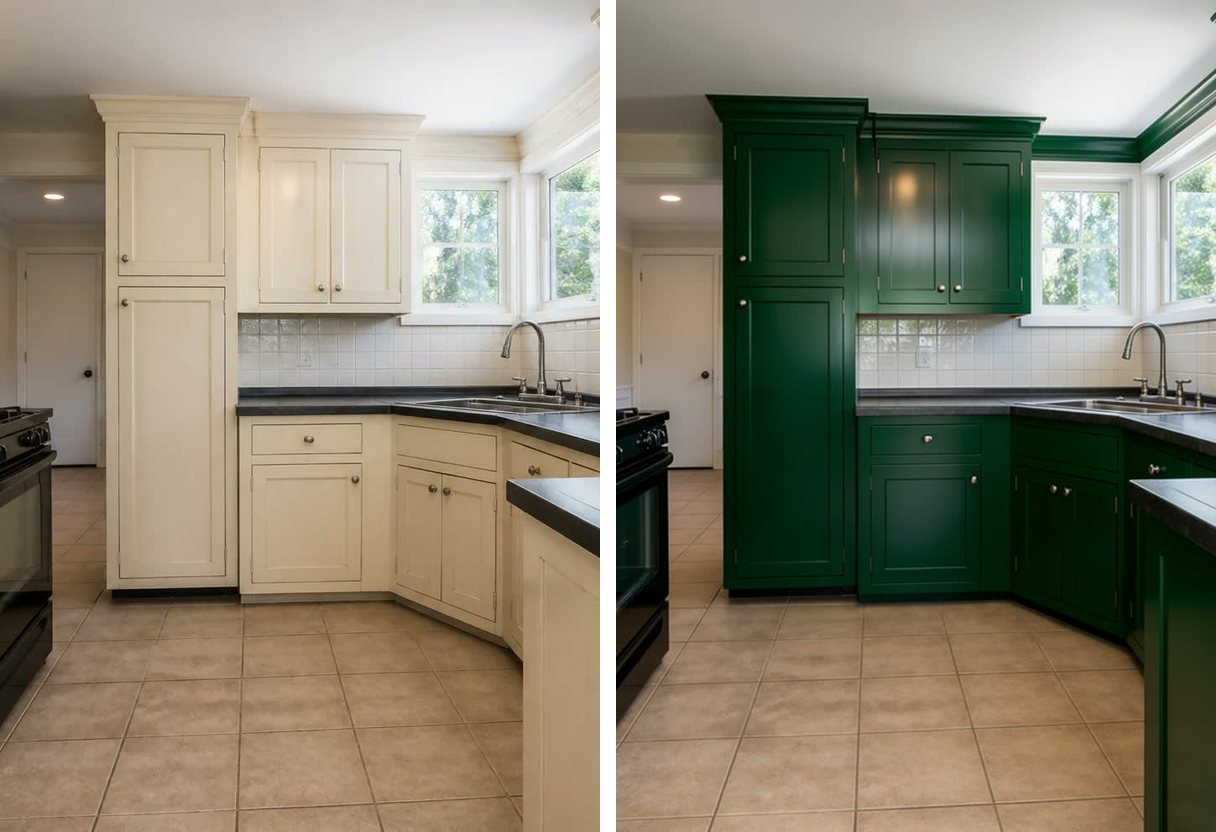
There is no single best AI for kitchen design. There are 4 different kinds of tool, and each is good at a different job.
Search for an AI app for kitchen design and the tools look alike. They are built for different jobs. If you pick the wrong kind, you get a nice picture that does not help you decide anything.
The short version: use a chatbot for planning and questions, a 3D planner for exact sizes and orders, and an AI built for kitchens when you want to see your own kitchen with a change.
What are the 4 kinds of AI kitchen design tool?
Here is each kind, with an honest note on where it is the better choice.
General chatbots, like ChatGPT
A chatbot is a language model you talk to, and it is very good with words. Ask it to split a budget, explain a contractor quote, list questions to ask 3 contractors, or put the steps of the work in order. It does not need to see your kitchen for any of that.
It is weaker at pictures of your room. OpenAI's own documentation says its image model may not follow the exact area you tell it to edit, and may have difficulty placing things precisely in layout-sensitive pictures.1 A kitchen is about as layout-sensitive as a room gets.
We ran 1 photo through an image model 2 times. A loose instruction gave a beautiful kitchen with a different window, a different range and no sink. That model was not ChatGPT, and we have not tested ChatGPT, so its limits here come from OpenAI's documentation.
The full test is in Can ChatGPT design your kitchen?
Better choice when: you need a budget, a checklist, a plain explanation of a quote, or questions for a contractor.
General AI room redesign tools
These tools restyle a photo of any room: a living room, a bedroom or a kitchen. They are useful for gathering ideas, and for homes where you want to redo more than the kitchen.
The risk is that your kitchen is only 1 case among many. In public reviews of AI interior design apps in 2026, people describe a window that was not there, or a picture of a completely different room.2 These are individual reviews, not survey data, and some tools keep your room better than others.
Better choice when: you want ideas for several rooms, not only the kitchen.
3D kitchen planners, like the IKEA planner
A 3D planner is a drawing tool. You enter the size of your room, place cabinets and appliances, and look at a 3D model.
The IKEA Kitchen Planner is a product configurator. IKEA says the planner works online, so you do not need to download a program.3
You draw your room, place cabinets from IKEA's own range, and get real dimensions and a real price. It does that job very well.
What a planner does not tell you is how the result will look in your room and your light. It also only holds cabinets from its own range. People who search for an AI kitchen planner often find these tools mixed in with picture tools, but they answer different questions: a planner tells you what fits, and a picture tool shows how it looks.
We cover this in IKEA kitchen planner alternatives.
Better choice when: you need exact sizes, a layout change, or an order list.
AI built only for kitchens, from your own photo
This kind starts from a photo of your real kitchen. The photo works as the floor plan. The tool reads where the walls, the window, the sink and the range are, then changes the surfaces and the style.
KitchenGPT is this kind of AI kitchen remodel tool. You can change 1 thing at a time, such as cabinet color, flooring, backsplash, handles, countertop or an appliance, or restyle the whole room in 1 of 200+ styles. It is built to keep your layout, your window and your camera angle.
No tool keeps every detail every time, ours included, so check each result against your photo. The photo tool shows the look only. A picture is not a drawing a contractor can build from, so for measured layouts KitchenGPT has a separate configurator.
Better choice when: your layout is staying and the real question is how it will look.
What should you test before you pay for AI kitchen design software?
A major kitchen remodel costs about $55,000 at the median in the US.4 In 1 survey, 58% of homeowners said they regret at least 1 aspect of their renovation.5 A few test pictures are a cheap way to catch a wrong choice before it is built.
Use the same photo of your own kitchen in every tool, and run these 5 tests.
- Does it keep your real room? Check the window, the doors, the walls, the sink and the range. If any of them moved, the result is a mood picture, not your kitchen. Our 5-minute check walks through each point.
- Can you change 1 thing at a time? If you change the cabinets, the tile and the floor together and you dislike the result, you do not know which of the 3 is wrong. Change 1 surface, look, then change the next.
- Can you compare many looks on the same photo? You learn your taste by comparing. Having just 1 or 2 results is not enough to choose from.
- Can you take the result to a contractor or a showroom? Check that you can save the picture and share it. A picture shows the look you want. Your contractor will still measure the room.
- What does it cost, and can you get your money back? Find the price, the cancel steps and the refund terms before you enter a card. Ask what happens when a result fails or comes back wrong. KitchenGPT has a 30-day money-back guarantee. Read the refund policy before you pay.
Which is the best AI kitchen design tool for your project?
It depends on the question you are stuck on.
- You are still deciding the budget and the plan. Use a chatbot. Ask it for a budget split, a list of questions for contractors, and the order of the work.
- You are moving walls, plumbing or the sink. Start with a 3D planner. You need exact sizes, and a picture cannot give them.
- You have chosen IKEA cabinets. Use the IKEA planner to get a valid, priced order.
- You want ideas for the whole house. A general AI room tool is a reasonable choice.
- Your layout is staying and you are stuck on how it will look. Use an AI built for kitchens, with your own photo.
- You want someone responsible for the result. Hire a designer. An AI kitchen designer is software, and it cannot take that responsibility. The pictures can still show a person what you mean.
Many projects use 2 or 3 of these. A chatbot builds the plan, a photo tool settles the look, and a planner or your supplier handles the order. Settle the look before you order, because changing your mind is free in a picture and expensive in a cabinet.
Try it on your own kitchen
If your layout is staying, start with the 2-minute quiz. It is free to take. It picks a style direction for you, and you can add 1 photo of your kitchen.
To open your kitchen in that style, you choose a plan. Then run the 5 tests above on the result.
Sources
- OpenAI, image generation guide. Masking is prompt-based and may not follow a mask's exact shape. Placing elements precisely in layout-sensitive compositions is a listed limitation. Read the documentation
- Public reviews of AI interior design apps, read in August 2026. Individual accounts, not survey data. They are quoted in How to tell if an AI kitchen tool actually kept your kitchen.
- IKEA, Kitchen Planner page, read 6 August 2026.
- Median major kitchen remodel, $55,000. 2026 U.S. Houzz Kitchen Trends Study, n=1,780 U.S. homeowners. Read the study
- Clever Offers, "Home Renovation Trends 2026", published 16 February 2026. n=1,000 U.S. homeowners, surveyed 17 to 22 December 2025. "58% [say] they feel regret about at least one aspect of their renovation." https://cleveroffers.com/research/home-renovation-trends-2026/
The comparisons rest on our earlier articles, Can ChatGPT design your kitchen? and IKEA kitchen planner alternatives. No third-party product was benchmarked for this article.
See it on your own kitchen before you commit
Upload one photo. Change the cabinets, the floor or the tile, and get your own room back with everything else exactly where it was.
Try it on my kitchen30 days money back. Cancel in one click. Failed generations never cost credits.